Posit AI - Private Beta Testing
Welcome
Thank you for joining the private beta to test new AI functionality within the RStudio IDE. Your feedback will be critical for preparing these tools for public release. Not on the waitlist yet? Join here
Our goal is to accelerate data science workflows by providing AI support that is intuitive, transparent, and powerful. We are starting with two key features:
- Posit Assistant: A chat-based interface with full context of your R session
- Next-Edit Suggestions (NES): Intelligent, context-aware autocompletion that predicts your next steps
Why did we make this?
We believe AI assistants can be truly useful for data science. We’ve been inspired by coding agents like Claude Code, which demonstrate how powerful LLMs can be when allowed to work semi-autonomously. At the same time, data science differs from pure coding tasks: constructing your own understanding of the data matters just as much, if not more than, whatever final artifact you produce. A data analysis assistant must help you understand your data, not just produce code to process it. We designed Posit Assistant with this in mind, and made careful prompting and UI decisions to allow it to act as both a powerful coding agent and a partner in data analysis.
What can Posit Assistant do?
Broadly, Posit Assistant can help with coding and data analysis tasks. Here are some example prompts:
- “Load
yearly_rainfall.csvand compare rainfall across locations” - “
calculate_monthly_totals()produces an error, can you fix it?” - “Why are there so many missing values in that column?”
- “Tell me how the code in this directory works.”
- “I don’t like how the package is organized, can you refactor it?”
- “/report summarize all findings so far” (the
/reportslash command creates a Quarto report) - “Turn this analysis into a Shiny app that lets the user select the year”
Please Use Caution
You should be aware that Posit Assistant is an experimental AI tool. By participating in this beta, you acknowledge that the Assistant has the capability to:
- Read and Analyze: Access files within your environment to provide context.
- Modify Data: Directly edit or overwrite files based on your requests.
- Execute Code: Automatically generate and run arbitrary R code on your behalf to perform data analysis and system tasks.
We do not recommend working with sensitive data during the beta period. Always review the code generated and executed by the Assistant to ensure it aligns with your intentions.
Posit Assistant is currently powered by Anthropic, and although your data is shared with them for processing to enable the AI functionality, a Zero Data Retention (ZDR) agreement is in place that prohibits them from storing your data for model training purposes. During the beta phase, Posit is collecting trace data from your conversations to help improve the service, as outlined in the beta agreement.
Feedback
This is a pre-release, experimental build under active development and is largely untested. You should expect bugs, potential crashes, and performance issues.
If you encounter bugs or rough spots, please report them to our GitHub Issues page.
For general feedback on your experience using Posit AI and community discussion, please use the new community forum.
Getting Started
- Download and install the current beta candidate at dailies.rstudio.com
We recommend using RStudio Desktop (open source). RStudio Server will also work but is not currently our focus and has received less testing (but we’re happy to receive Server-specific bug reports!) Posit AI is not currently available in Workbench.
Start RStudio
Show the Sidebar via the toolbar button (or View > Show/Hide Sidebar on the main menu)
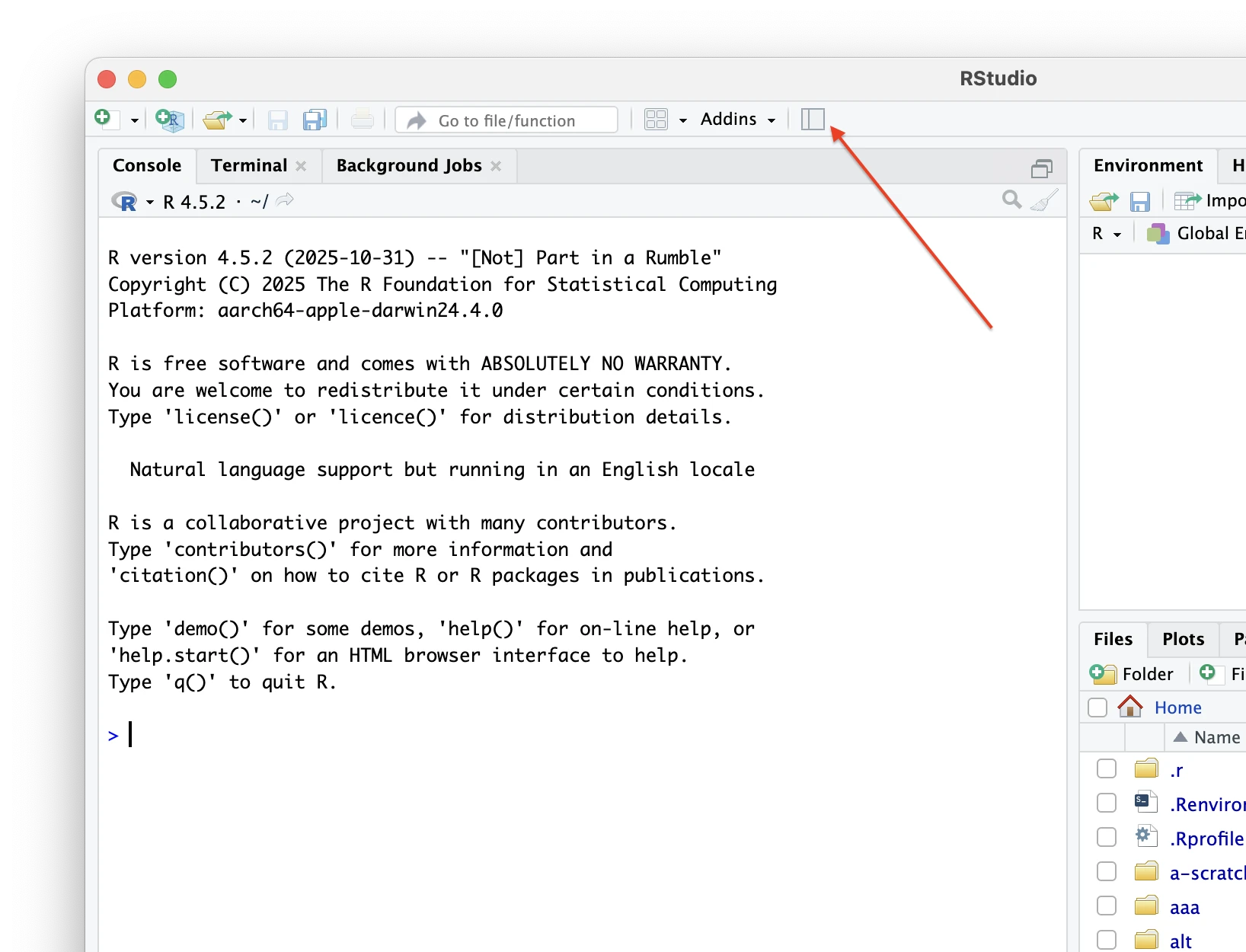
- The pane will ask you to install the Posit Assistant; click the button to do so
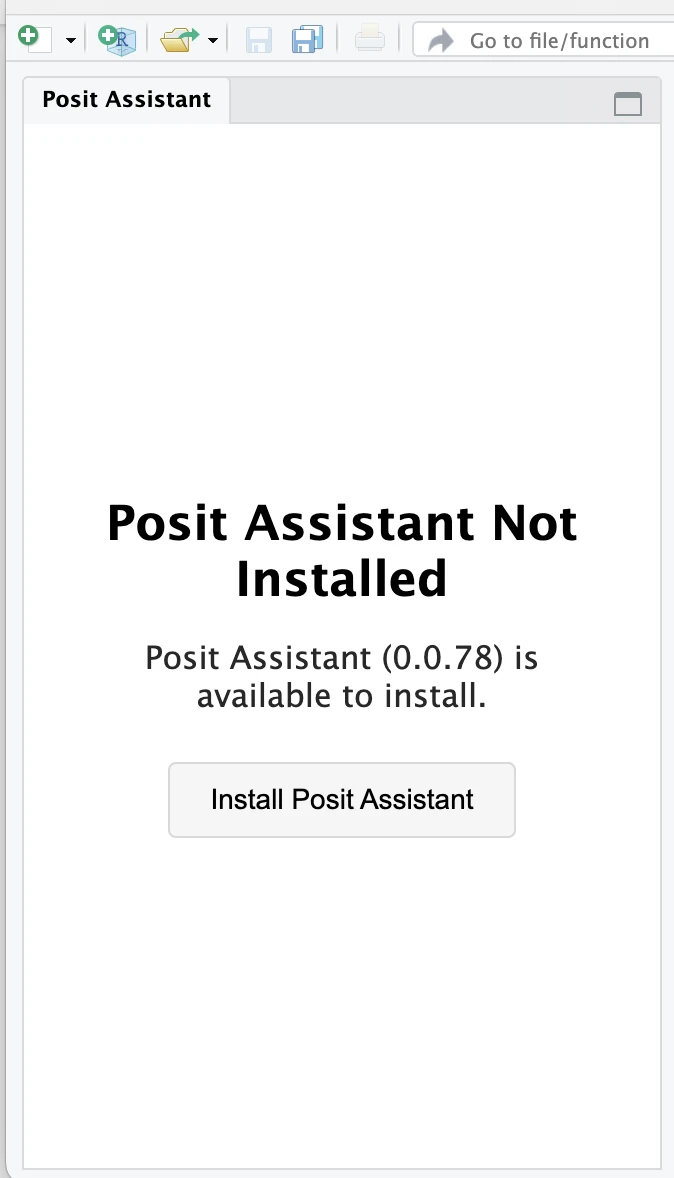
- After the download and install happens you will see the Posit Assistant UI with a Sign In button.
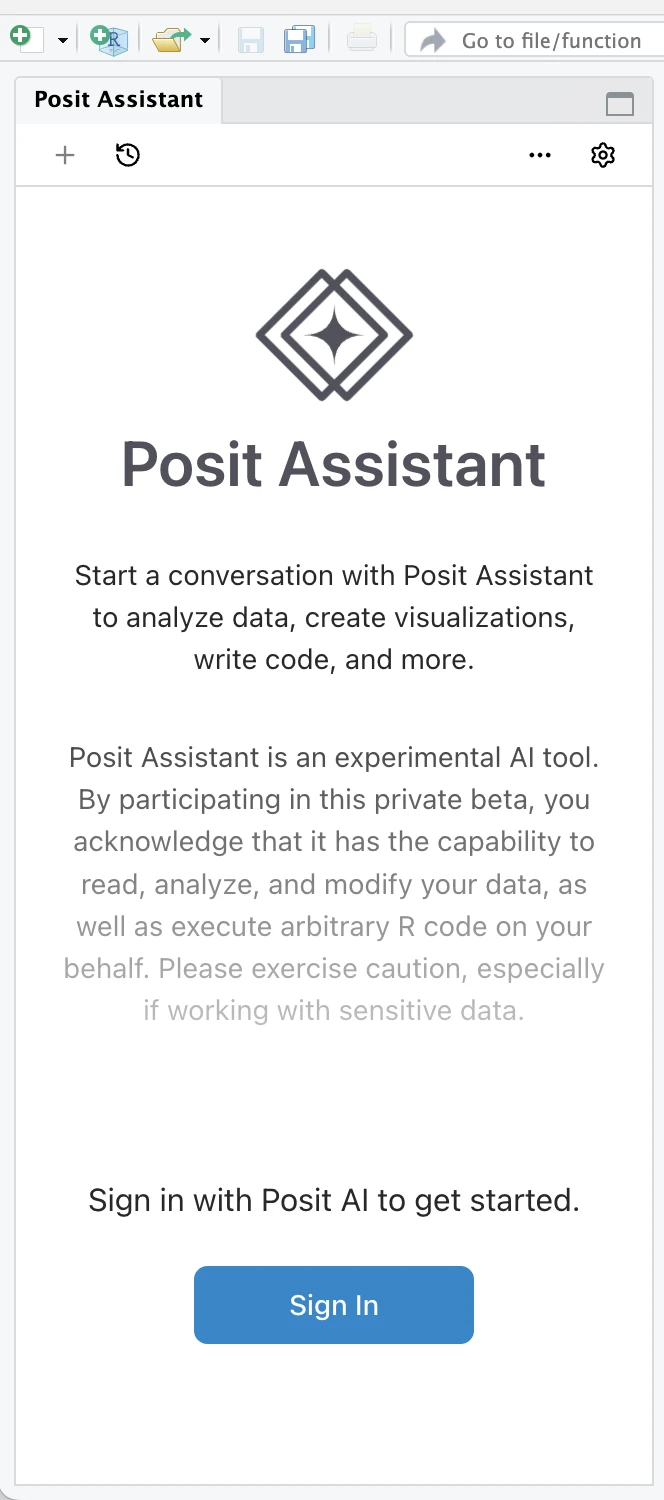
- Click on Sign In and go through the sign-up flow in your browser
- Open Browser to Authorize
- Create a Posit AI account on
login.posit.cloud - Authorize access
- Return to RStudio
You must create your account using the same email address where you received the beta invitation. If you are using GitHub to sign in, ensure this email is set as your primary GitHub email.
- After successfully authenticating, you will see this; click Close and the chat feature should now be ready for use.
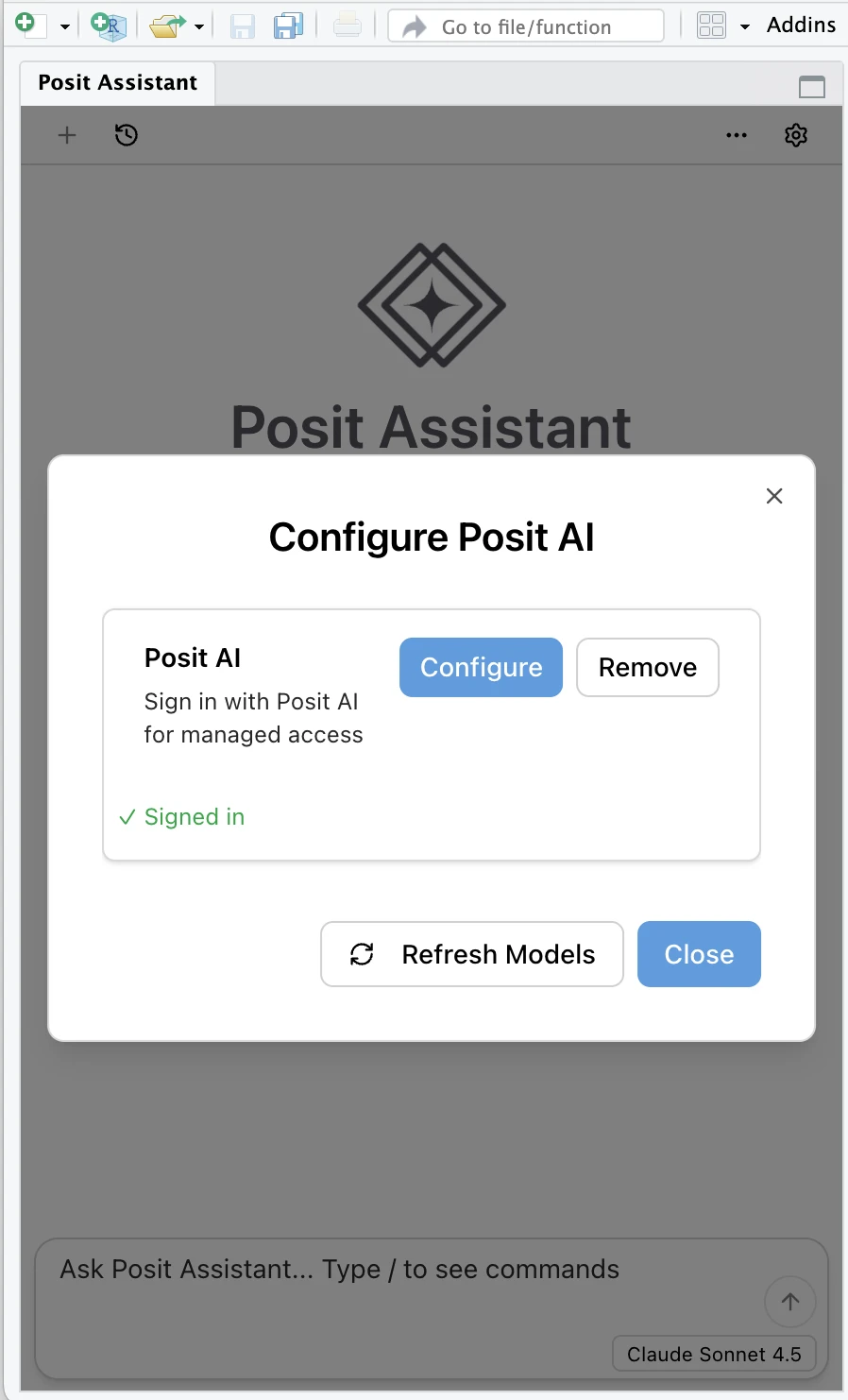
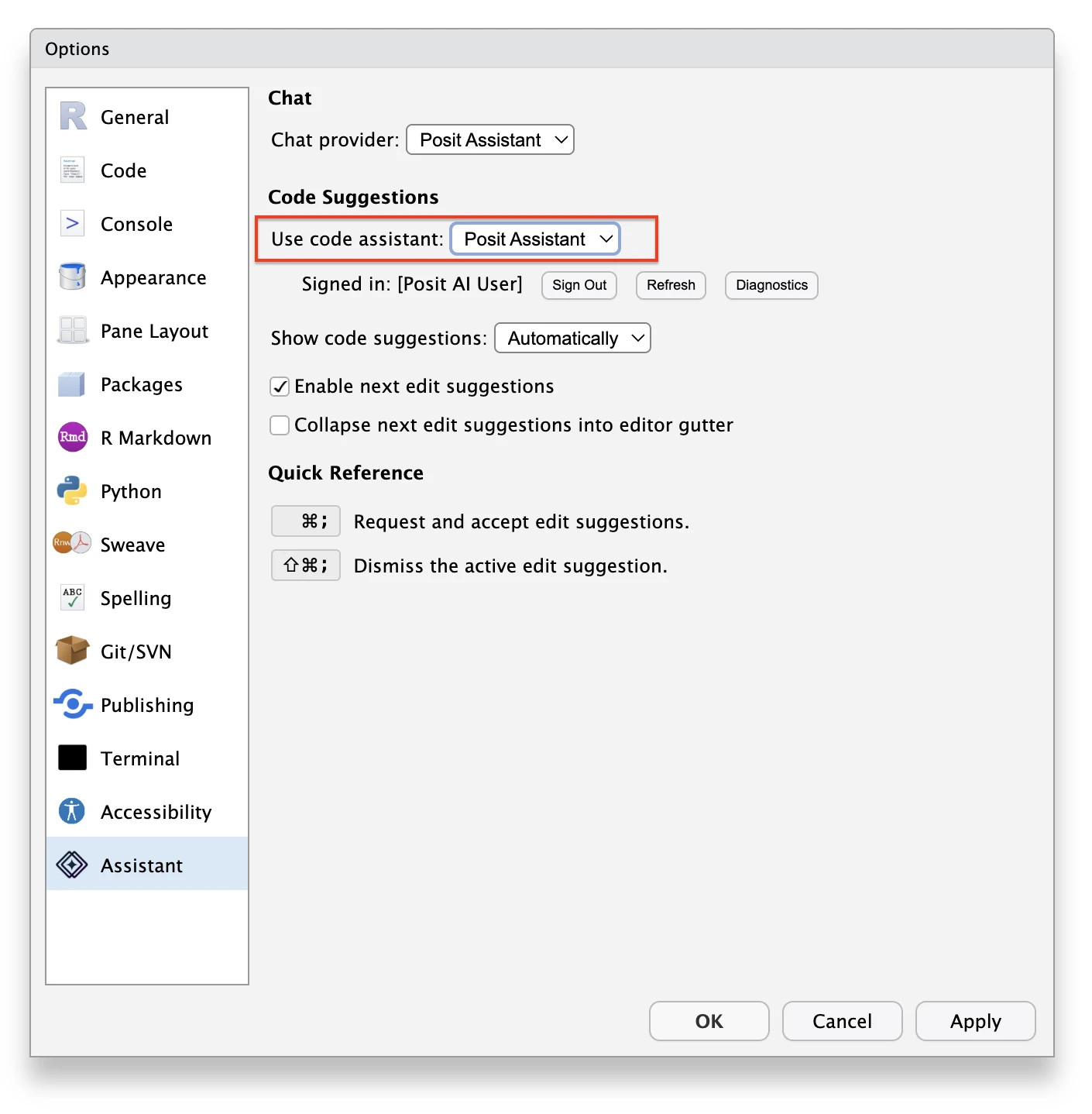
- To enable Posit-AI-based completions (aka Next Edit Suggestions), go to Tools > Global Options > Assistant and choose Posit Assistant from the “Use code assistant” dropdown
Please note that if you prefer, you can move the Chat pane to one of the other general-purpose quadrants via Tools > Global Options > Pane Layout and keep the Sidebar hidden.
New Tools
Posit Assistant
Posit Assistant is a chat-based interface with full context of your R session. Posit Assistant can work with you on exploratory data analysis and also write, refactor, and execute code as a dedicated agent.
Once Posit AI is configured within Posit Assistant, you are able to interact via the chat box in the side panel.
Chat Box
- Ask anything: Ask Posit Assistant anything you like. For example, help me analyze the data in results.csv.
- Model selector: Click on the current LLM model to reveal other available models.
- Token Usage: Hover over the token tracker to see how many tokens have been used in the session. Click it for details.
- Slash commands:
- /report: Create a report as a Quarto document
- /savememory: Create or update a memory file
- /compact: Compact conversation to reduce token usage
Next-Edit Suggestions (NES)
Next-Edit Suggestions (NES) are a souped-up autocomplete, providing intelligent suggestions while you type based on your recent edits and your live R and Python session context. If you’ve used Copilot’s Next Edit Suggestions, Windsurf’s Supercomplete, Zed’s Edit Predictions, or Cursor Tab, this may feel familiar to you.
Our NES is similar to those systems in that it’s powered by a suite of “small” LLMs that are fine-tuned to understand your recent file edits and anticipate what changes you’ll make next.
Most of the time, NES will appear as “ghost text” at your cursor, which you can choose to accept. Sometimes, NES will also make predictions elsewhere in the document you’re working on; for example, if you rename a column in a data frame, NES might suggest updating the column name later in your analysis.
Where our NES diverges from other systems is that we also incorporate context from your live computational session (and fine-tune models to understand this kind of context), meaning that the model can “see” the column names of data frames and signatures of functions you’re working with and integrate them into suggestions. (Notably, the model will not have access to the actual values inside of data frame columns or other variables.)
Currently, NES is turned off by default. To enable it, navigate to Tools > Global Options > Assistant and set “Use code assistant” to Posit Assistant.
Once you enable it, note the “Show code suggestions” option:
- Automatically means that you will receive edit suggestions as you type (with a configurable delay),
- Manually allows you to only receive NES after explicitly requesting them.
During the private beta, we’ll be experimenting with a number of NES models and prompting approaches. This will happen automatically “under the hood,” and we’ll be analyzing rates of acceptance to understand the kinds of next edit suggestions that are most helpful for users. Traces from accepted suggestions will be used to train our edit suggestion model and we will be reading traces from suggestions—regardless of acceptance—to better understand the behavior of our system.
Known Issues
- A new conversation is started any time you hide/show the Chat pane, or reconfigure its location, or restart your R session; previous conversation should be in the history and you can switch back to it
- Posit Assistant is not yet directly aware of:
- Plots in the plots pane that weren’t generated by the AI
- Installed packages (but it may figure this out by running R code)
- Package management in general (e.g. it isn’t aware yet if you are using renv, etc.)
- Build pane results (i.e. if doing package development)
- Editing files via chat that are loaded in the editor is not fully implemented (it should be able to make edits but you won’t get any opportunity to approve/reject, and Undo stack may not correctly undo such changes)
- May need to restart RStudio after enabling Posit-AI completions feature before it will start working
If you run into other issues, please report them to our GitHub Issues page.
Troubleshooting
The chatbot is not responding
Make sure that you are signed in to Posit AI. Gear Menu > Configure Posit AI
If you are signed-in, try restarting RStudio. If that does not work, please file a bug with what you see.
I want to delete all Posit AI binaries
To restart Posit Assistant from a clean state, close all instances of RStudio and delete the following folders:
~/.local/share/rstudio/pai/
%LOCALAPPDATA%\RStudio\pai\
I want to delete all conversations and authentication tokens
~/.positai
%USERPROFILE%\.positai\
Frequently Asked Questions (FAQs)
General
Why is Posit adding AI functionality to RStudio?
Through our work on AI functionality in Positron, we’ve seen firsthand how AI tools can accelerate and improve data science workflows. Posit Assistant brings these AI capabilities into RStudio.
Posit is committed to building tools that produce correct, transparent, and reproducible results. AI assistants are no different. We wanted to build AI functionality within RStudio that is aligned with this stance, bringing RStudio users up to the state-of-the-art while continuing to produce reliable insights, code, and results.
What feedback is most useful in this beta phase?
While we want to hear about bugs or installation issues, the most valuable feedback comes from your real-world data science workflows. As you go through your normal day, cleaning and exploring data, building models, or troubleshooting errors, please take note of how Posit AI helps or hinders your process. Provide feedback here.
Usage
How can these new tools support my work?
Posit Assistant can help with a variety of tasks, including:
- Writing and editing code: Have Posit Assistant write code for a specific purpose, or refactor existing code. This includes tasks like writing R packages, creating Shiny apps, and editing code in a Quarto document.
- Debugging: Get help identifying and fixing issues in your code.
- Exploratory data analysis: Explore your data directly within the chat. Posit Assistant can summarize datasets, check for quality issues, visualize relationships, etc., and will offer suggested next steps at each turn.
- Understanding a codebase or set of files: Get explanations of how code works or answers about unfamiliar files.
- Creating reports: Generate Quarto documents from your analysis using the
/reportcommand. - Collaborating on approaches: Discuss your strategy for your tasks with Posit Assistant, get suggestions for alternatives, or talk through unexpected results.
Next-Edit Suggestions (NES) speeds up your coding process by predicting your next edits as you type. Because NES can see your live R or Python session, suggestions are specific to what you’re working on.
Is there a usage cap during the private beta period?
Not explicitly. However, we reserve the right to cap usage based on excessive token consumption.
Privacy & Security
Which LLM providers does Posit AI rely on?
We currently use Anthropic models to power Posit Assistant. Next-Edit Suggestions (NES) is supported by a number of specialized LLMs hosted by Posit.
Do you have a Zero Data Retention Policy with the language providers?
We have a Zero Data Retention (ZDR) agreement in place with Anthropic. This means that when you send a prompt, Anthropic uses it to generate a response and then immediately deletes the data. They do not store your code or text on their servers after the request is processed.
Will Posit use user data collected from Posit AI to train models or improve the service?
During beta testing, Posit will collect trace data - logs of how the tools are used - to help us improve Posit Assistant and Next-Edit Suggestions (NES). After the beta, users will have a clear option to opt in or out of this type of data collection.
Compatibility
Is Posit AI available on Workbench for RStudio Pro or Positron Pro?
Not currently. We are focused first on the desktop experience, but we are planning ways to bring equivalent Posit AI functionality to Workbench that specifically meet the needs of enterprise teams and shared environments.
Is Databot also coming to RStudio?
Databot as it currently exists in Positron is not coming to RStudio. However, Posit Assistant builds on what we’ve learned with Positron Assistant and Databot and combines the conversational convenience of a chat assistant with the power of a data analysis agent.
This means - similar to Databot - Posit Assistant can directly help with exploratory data analysis, such as summarizing datasets, teasing out relationships, and visualizing findings.
When is Posit AI coming to Positron?
Our initial priority is to make the experience as valuable as possible in the RStudio IDE, which lacks the native AI support and extension opportunities available in Positron. Eventually, however, we expect the Posit AI service to support AI tools in both development environments.
Terms and Conditions
By using Posit AI during this Private Beta, you agree to the Posit AI Agreement.